
Be honest, where do you actually keep track of the classes, events and providers you've been meaning to look into? A screenshot in your camera roll. A browser tab you're too scared to close. A sticky note with half a business name on it that you can't quite remember searching for in the first place.
Most homeschool families end up with some version of this system, if you can even call it a system. It works, sort of, until you need to actually find something again.
That's exactly what Heart and Save is for.
What Heart and Save Actually Does
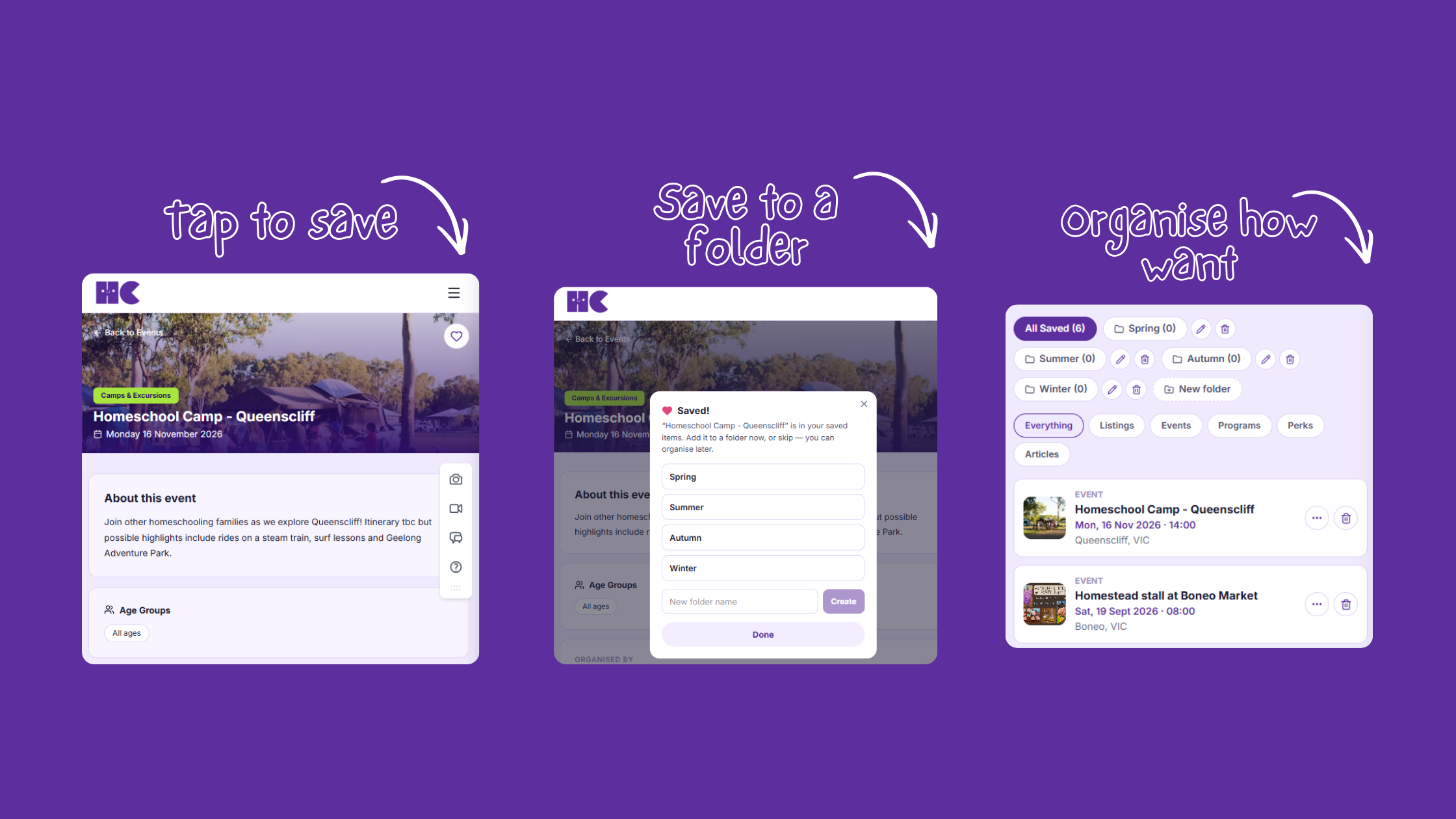
Anything on Homeschool Central can be saved. Classes, events, local providers, academic programs, local attractions, meetups, all of it. See something that catches your eye while you're browsing? Tap the heart, and it's saved.
From there, you can organise your saved items into folders. You name the folders. You decide what goes in each one. There's no fixed structure to follow and nothing you're required to set up a certain way, it's genuinely just yours to arrange however makes sense for your family.
A Few Ideas for Organising Your Folders
Since a blank slate can sometimes be harder than a template, here are a few ways families might choose to set theirs up, purely as inspiration, not rules.
By child. If you've got more than one child with different interests, ages or stages, a folder for each one keeps things from turning into one giant, confusing list.
By term or season. Some families like to plan ahead a season at a time, saving things now that they'll want to book or revisit when the time comes.
By subject or theme. If you're building a unit around a particular topic, a dedicated folder can hold every class, event or attraction connected to it in one place.
A running "field trip" list. If your family loves a good day out, a folder just for local attractions you'd like to visit is a nice way to build a list over time, especially useful alongside our Turn This Into a Field Trip content, so you've always got a few ready to go when a free day comes up.
None of these are built into the platform as set categories. They're just starting points. Plenty of families land on something entirely different once they get going, and that's exactly how it should work.
A Couple of Ways Families Actually Use It
Comparing providers is a good one. Instead of reopening five different tabs to compare a few local art classes, save each one as you come across it, then look through them properly later, side by side, once you've actually got a spare ten minutes.
Meetups are another. It's easy for a community meetup to get lost in the scroll between the day you see it and the day it actually happens. Saving it means it's sitting right there when you need it, rather than relying on memory or a lucky scroll back through old posts. If meetups are a regular part of your week, it's worth pairing Heart and Save with our Meetups page so you never lose track of what's coming up.
Give It a Go
Next time you're browsing classes, events or programs and think "I should remember this for later," that's your cue. Tap the heart, pop it in a folder, and let future you thank present you for not relying on a screenshot this time.